



C++条件分岐完全ガイド:if、if-else、ネストされたif-elseの仕組みと実例
C++ if、if-else、ネストされたif-else
このチュートリアルでは、意思決定プログラムを作るための if...else 文を実例とともに学習します。
コンピュータプログラミングでは、特定の条件下でコードブロックを実行し、別の条件下では別のブロックを実行するために if...else 文を使用します。
例えば、学生の得点に基づいて成績(A、B、C)を割り当てる場合:
- パーセンテージが 90 以上なら成績 A
- パーセンテージが 75 以上なら成績 B
- パーセンテージが 65 以上なら成績 C
if...else 文にはC++で3つの形式があります:
if文if...else文if...else if...else文
C++ if 文
if 文の構文は:
if (condition) {
    // if文の本体
}
if 文は括弧 ( ) 内の condition を評価します。
conditionがtrueなら、ifの本体内コードが実行されるconditionがfalseなら、ifの本体内コードはスキップされる
{ } 内のコードが if 文の本体です。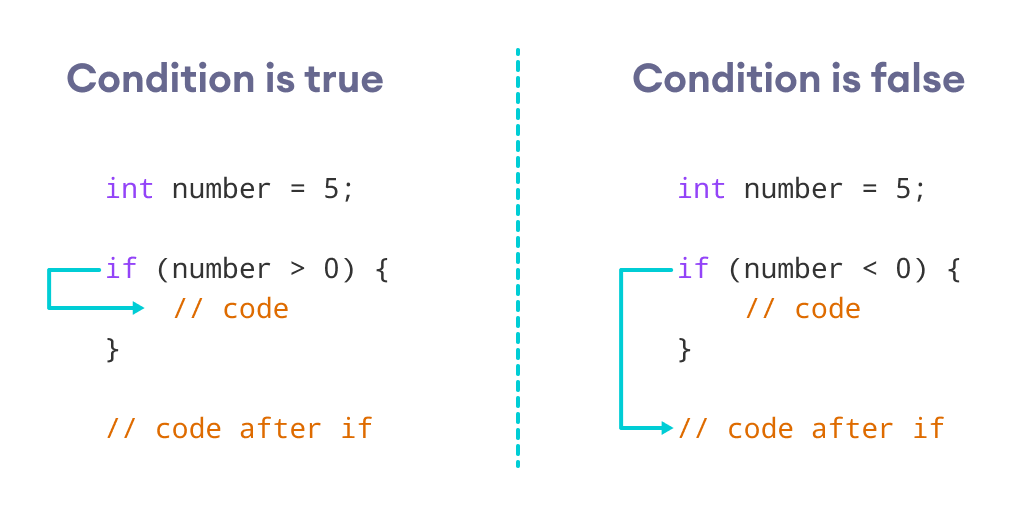
実例 1: C++ if 文
// ユーザーが入力した正の数を出力
// 負の数を入力した場合はスキップされる
#include <iostream>
using namespace std;

int main() {
    int number;
    cout << "Enter an integer: ";
    cin >> number;

    // 数が正かどうかチェック
    if (number > 0) {
        cout << "You entered a positive integer: " << number << endl;
    }
    cout << "This statement is always executed.";
    return 0;
}
出力 1
Enter an integer: 5
You entered a positive number: 5
This statement is always executed.
ユーザーが 5 を入力すると、条件 number > 0 が true と評価され、if の本体内ステートメントが実行されます。
出力 2
Enter a number: -5
This statement is always executed.
ユーザーが -5 を入力すると、条件 number > 0 が false と評価され、if の本体内ステートメントは実行されません。
C++ if...else 文
if 文にはオプションの else 節を付けられます。構文は:
if (condition) {
    // 条件が真のときのコードブロック
} else {
    // 条件が偽のときのコードブロック
}
if..else 文は括弧内の condition を評価します。
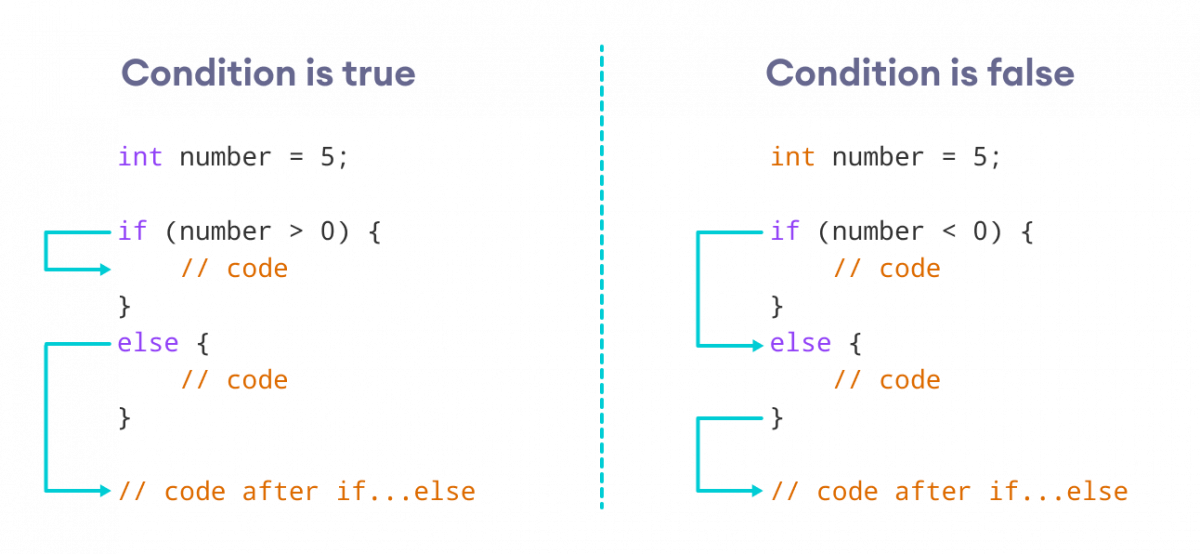
condition が true と評価される場合:
ifの本体内コードが実行されるelseの本体内コードは実行されない
condition が false と評価される場合:
elseの本体内コードが実行されるifの本体内コードは実行されない
実例 2: C++ if...else 文
// 整数が正か負かをチェックするプログラム
// このプログラムでは 0 を正の数として扱う
#include <iostream>
using namespace std;

int main() {
    int number;
    cout << "Enter an integer: ";
    cin >> number;

    if (number >= 0) {
        cout << "You entered a positive integer: " << number << endl;
    } else {
        cout << "You entered a negative integer: " << number << endl;
    }
    cout << "This line is always printed.";
    return 0;
}
出力 1
Enter an integer: 4
You entered a positive integer: 4.
This line is always printed.
条件 number >= 0 があります。0以上の数を入力すると条件は true になります。
ここでは 4 を入力。条件は true なので、if の本体内ステートメントが実行されます。
出力 2
Enter an integer: -4
You entered a negative integer: -4.
This line is always printed.
ここでは -4 を入力。条件は false なので、else の本体内ステートメントが実行されます。
C++ if...else...else if 文
if...else 文は2つの選択肢のうち1つを実行します。しかし、2つ以上の選択肢から選ぶ必要がある場合は if...else if...else 文を使います。
if...else if...else 文の構文は:
if (condition1) {
    // コードブロック 1
} else if (condition2) {
    // コードブロック 2
} else {
    // コードブロック 3
}
ここで:
condition1がtrueならコードブロック 1が実行condition1がfalseならcondition2を評価condition2がtrueならコードブロック 2が実行condition2がfalseならコードブロック 3が実行
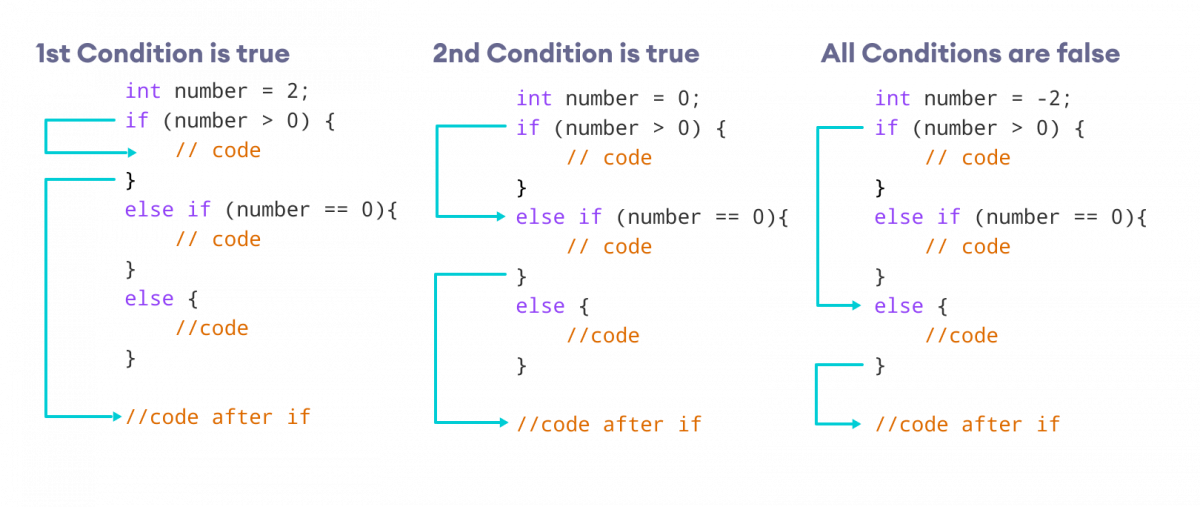
注意: else if 文は複数書けますが、if と else はそれぞれ1つだけです。
実例 3: C++ if...else...else if
// 整数が正、負、ゼロのどれかをチェックするプログラム
#include <iostream>
using namespace std;

int main() {
    int number;
    cout << "Enter an integer: ";
    cin >> number;

    if (number > 0) {
        cout << "You entered a positive integer: " << number << endl;
    } else if (number < 0) {
        cout << "You entered a negative integer: " << number << endl;
    } else {
        cout << "You entered 0." << endl;
    }
    cout << "This line is always printed.";
    return 0;
}
出力 1
Enter an integer: 1
You entered a positive integer: 1.
This line is always printed.
出力 2
Enter an integer: -2
You entered a negative integer: -2.
This line is always printed.
出力 3
Enter an integer: 0
You entered 0.
This line is always printed.
このプログラムでは、ユーザーから数値を受け取り、if...else if...else ラダーで正・負・ゼロを判定しています。
数が 0 より大きければ if ブロック、小さければ else if ブロック、それ以外(ゼロ)なら else ブロックが実行されます。
C++ ネストされた if...else
ある if 文の中に別の if 文を置く必要がある場合があります。これはネストされた if 文と呼ばれます。
これは if 文の多重レイヤーと考えられます。最初に外側の if 文があり、その中に内側の if 文があります。構文は:
// 外側のif文
if (condition1) {
    // ステートメント
    // 内側のif文
    if (condition2) {
        // ステートメント
    }
}
注意点:
- 内側の
if文に必要に応じてelseやelse ifを追加可能 - 内側の
if文は、外側のelseやelse if内(存在する場合)にも配置可能 if文を複数層ネスト可能
実例 4: C++ ネストされた if
// ネストされたif文を使って整数が正、負、ゼロかを判定するC++プログラム
#include <iostream>
using namespace std;

int main() {
    int num;
    cout << "Enter an integer: ";
    cin >> num;

    // 外側のif条件
    if (num != 0) {
        // 内側のif条件
        if (num > 0) {
            cout << "The number is positive." << endl;
        }
        // 内側のelse条件
        else {
            cout << "The number is negative." << endl;
        }
    }
    // 外側のelse条件
    else {
        cout << "The number is 0 and it is neither positive nor negative." << endl;
    }
    cout << "This line is always printed." << endl;
    return 0;
}
出力 1
Enter an integer: 35
The number is positive.
This line is always printed.
出力 2
Enter an integer: -35
The number is negative.
This line is always printed.
出力 3
Enter an integer: 0
The number is 0 and it is neither positive nor negative.
This line is always printed.
上記例では:
- ユーザーから整数を入力として受け取り、変数 num に格納
if...else文で num が0と等しくないかチェックtrueなら 内側 のif...else文を実行falseなら 外側 のelse条件のコードを実行し、「The number is 0 and it is neither positive nor negative.」を出力
- 内側 の
if...else文で入力数が正かどうか(num > 0)をチェックtrueなら正の数だと出力falseなら負の数だと出力
if...else はロジックを複雑にします。可能であれば常にネストを避けるよう努めましょう。本体が1ステートメントのみの if...else
if...else の本体が1ステートメントのみの場合、{ } を省略できます。例:
int number = 5;
if (number > 0) {
    cout << "The number is positive." << endl;
} else {
    cout << "The number is negative." << endl;
}
を以下のように置き換え可能:
int number = 5;
if (number > 0)
    cout << "The number is positive." << endl;
else
    cout << "The number is negative." << endl;
両プログラムの出力は同じです。
{ } を使うとコードが読みやすくなります。意思決定についてさらに学ぶ
特定の状況では、三項演算子 が if...else 文に置き換え可能です。詳細は「C++ 三項演算子」を参照。
与えられたテスト条件に基づいて複数の選択肢から選ぶ必要がある場合は、switch 文が使用できます。詳細は「C++ switch」を参照。
さらに学ぶための例:
- C++ プログラム:数値が偶数か奇数かを判定
- C++ プログラム:文字が母音か子音かを判定
- C++ プログラム:3つの数値のうち最大値を求める
C言語
- C# 条件分岐をマスターする:if、if-else、if-else if、ネストした if 文
- C++ while/do-whileループ完全ガイド:繰り返し処理をマスターする
- C++クラスとオブジェクト完全ガイド:オブジェクト指向プログラミングの実践
- C++メモリ管理の極意:newとdeleteのエキスパート活用法
- C++ public/protected/private継承の違いを徹底解説
- C++フレンド関数とフレンドクラス:アクセス制御のマスター
- C++日付と時刻の完全ガイド:ctimeライブラリの活用
- C++オーバーロード完全マスター:関数と演算子のオーバーロード
- C++ファイルI/O完全マスター:fstreamによる読み書き
- Python 文・インデント・コメント: 明確なガイド
- Javaネストクラスとインナークラス完全ガイド:種類、例、ベストプラクティス