



VHDL で関数を使用する方法
関数は、頻繁に使用されるアルゴリズムを実装するために使用できる VHDL のサブプログラムです。関数は 0 個以上の入力値を取り、常に値を返します。戻り値に加えて、プロシージャと関数を区別するのは、Wait ステートメントを含めることができないことです。これは、関数が消費するシミュレーション時間が常にゼロであることを意味します。
他のプログラミング言語の関数やメソッドに精通している場合、VHDL 関数は簡単に理解できるはずです。 VHDL では、戻り値を省略したり void を返したりすることはできません。関数は常に何かを返す必要があり、戻り値を何かに割り当てる必要があります。
このブログ投稿は、基本的な VHDL チュートリアル シリーズの一部です。
VHDL には、pure の 2 種類の関数があります。 そして不純 機能。関数が純粋であるということは、外部信号を変更したり読み取ったりすることが許可されないことを意味します。特定の引数で純粋な関数を呼び出すと、常に同じ値が返されることは確実です。関数には副作用がないと言います .
VHDL で関数を宣言するための構文は次のとおりです。
[pure|impure] function <function_name> (<parameter1_name> : <parameter1_type> := <default_value>;
                                        <parameter2_name> : <parameter2_type> := <default_value>;
                                        ... ) return <return_type> is
    <constant_or_variable_declaration>
begin
    <code_performed_by_the_function>
    return <value>
end function;
pure/impure キーワードはオプションですが、キーワードを省略した場合はデフォルトで pure になります。すべてのパラメーターは、関数内で定数として扱われます。したがって、それらを変更することはできません。デフォルト値はオプションであり、関数は常に return で終了する必要があります
関数には、in の間に独自の宣言領域があります。 そして begin キーワード。ここで宣言された定数、シグナル、または変数は、関数自体の中でのみ有効であり、関数への後続の呼び出しでは値を保持しません。
エクササイズ
このチュートリアルでは、純粋関数に焦点を当てます。非純粋関数については、このシリーズの後のチュートリアルで説明します。
前のチュートリアルでは、有限状態マシン (FSM) を使用して信号機コントローラー モジュールを作成しました。ある状態から別の状態へのタイマー計算を含む多くの行をコピーして貼り付け、1 つの定数をわずかに変更しただけです。
関数を使用してステート マシン コードを簡素化する方法を確認します。
関数 testbench の最終的なコード :
library ieee;
use ieee.std_logic_1164.all;
use ieee.numeric_std.all;

entity T21_FunctionTb is
end entity;

architecture sim of T21_FunctionTb is

    -- We are using a low clock frequency to speed up the simulation
    constant ClockFrequencyHz : integer := 100; -- 100 Hz
    constant ClockPeriod : time := 1000 ms / ClockFrequencyHz;

    signal Clk         : std_logic := '1';
    signal nRst        : std_logic := '0';
    signal NorthRed    : std_logic;
    signal NorthYellow : std_logic;
    signal NorthGreen  : std_logic;
    signal WestRed     : std_logic;
    signal WestYellow  : std_logic;
    signal WestGreen   : std_logic;

begin

    -- The Device Under Test (DUT)
    i_TrafficLights : entity work.T21_TrafficLights(rtl)
    generic map(ClockFrequencyHz => ClockFrequencyHz)
    port map (
        Clk         => Clk,
        nRst        => nRst,
        NorthRed    => NorthRed,
        NorthYellow => NorthYellow,
        NorthGreen  => NorthGreen,
        WestRed     => WestRed,
        WestYellow  => WestYellow,
        WestGreen   => WestGreen);

    -- Process for generating clock
    Clk <= not Clk after ClockPeriod / 2;

    -- Testbench sequence
    process is
    begin
        wait until rising_edge(Clk);
        wait until rising_edge(Clk);

        -- Take the DUT out of reset
        nRst <= '1';

        wait;
    end process;

end architecture;
信号機 モジュール の最終的なコード :
library ieee;
use ieee.std_logic_1164.all;
use ieee.numeric_std.all;

entity T21_TrafficLights is
generic(ClockFrequencyHz : natural);
port(
    Clk         : in std_logic;
    nRst        : in std_logic; -- Negative reset
    NorthRed    : out std_logic;
    NorthYellow : out std_logic;
    NorthGreen  : out std_logic;
    WestRed     : out std_logic;
    WestYellow  : out std_logic;
    WestGreen   : out std_logic);
end entity;

architecture rtl of T21_TrafficLights is

    -- Enumerated type declaration and state signal declaration
    type t_State is (NorthNext, StartNorth, North, StopNorth,
                        WestNext, StartWest, West, StopWest);
    signal State : t_State;

    -- Calculate the number of clock cycles in minutes/seconds
    function CounterVal(Minutes : integer := 0;
                        Seconds : integer := 0) return integer is
        variable TotalSeconds : integer;
    begin
        TotalSeconds := Seconds + Minutes * 60;
        return TotalSeconds * ClockFrequencyHz -1;
    end function;

    -- Counter for counting clock periods, 1 minute max
    signal Counter : integer range 0 to CounterVal(Minutes => 1) +1;

begin

    process(Clk) is
    begin

        if rising_edge(Clk) then
            if nRst = '0' then
                -- Reset values
                NorthRed    <= '1';
                NorthYellow <= '0';
                NorthGreen  <= '0';
                WestRed     <= '1';
                WestYellow  <= '0';
                WestGreen   <= '0';
                State       <= NorthNext;
                Counter     <= 0;

            else
                -- Default values
                NorthRed    <= '0';
                NorthYellow <= '0';
                NorthGreen  <= '0';
                WestRed     <= '0';
                WestYellow  <= '0';
                WestGreen   <= '0';

                Counter <= Counter + 1;

                case State is

                    -- Red light in all directions
                    when NorthNext =>
                        NorthRed <= '1';
                        WestRed  <= '1';
                        -- If 5 seconds have passed
                        if Counter = CounterVal(Seconds => 5) then
                            Counter <= 0;
                            State   <= StartNorth;
                        end if;

                    -- Yellow light in north/south directions
                    when StartNorth =>
                        NorthRed    <= '1';
                        NorthYellow <= '1';
                        WestRed     <= '1';
                        -- If 5 seconds have passed
                        if Counter = CounterVal(Seconds => 5) then
                            Counter <= 0;
                            State   <= North;
                        end if;

                    -- Green light in north/south directions
                    when North =>
                        NorthGreen <= '1';
                        WestRed    <= '1';
                        -- If 1 minute has passed
                        if Counter = CounterVal(Minutes => 1) then
                            Counter <= 0;
                            State   <= StopNorth;
                        end if;

                    -- Red and yellow light in north/south direction
                    when StopNorth =>
                        NorthYellow <= '1';
                        WestRed     <= '1';
                        -- If 5 seconds have passed
                        if Counter = CounterVal(Seconds => 5) then
                            Counter <= 0;
                            State   <= WestNext;
                        end if;

                    -- Red light in all directions
                    when WestNext =>
                        NorthRed <= '1';
                        WestRed  <= '1';
                        -- If 5 seconds have passedf
                        if Counter = CounterVal(Seconds => 5) then
                            Counter <= 0;
                            State   <= StartWest;
                        end if;

                    -- Yellow light in west/east direction
                    when StartWest =>
                        NorthRed   <= '1';
                        WestRed    <= '1';
                        WestYellow <= '1';
                        -- If 5 seconds have passed
                        if Counter = CounterVal(Seconds => 5) then
                            Counter <= 0;
                            State   <= West;
                        end if;

                    -- Green light in west/east direction
                    when West =>
                        NorthRed  <= '1';
                        WestGreen <= '1';
                        -- If 1 minute has passed
                        if Counter = CounterVal(Minutes => 1) then
                            Counter <= 0;
                            State   <= StopWest;
                        end if;

                    -- Red and yellow light in west/east direction
                    when StopWest =>
                        NorthRed   <= '1';
                        WestYellow <= '1';
                        -- If 5 seconds have passed
                        if Counter = CounterVal(Seconds => 5) then
                            Counter <= 0;
                            State   <= NorthNext;
                        end if;

                end case;
            end if;
        end if;

    end process;

end architecture;
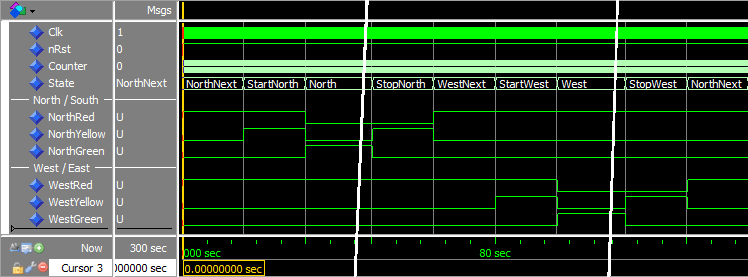
run 5 minに入った後の波形 ModelSim コンソールのコマンド:
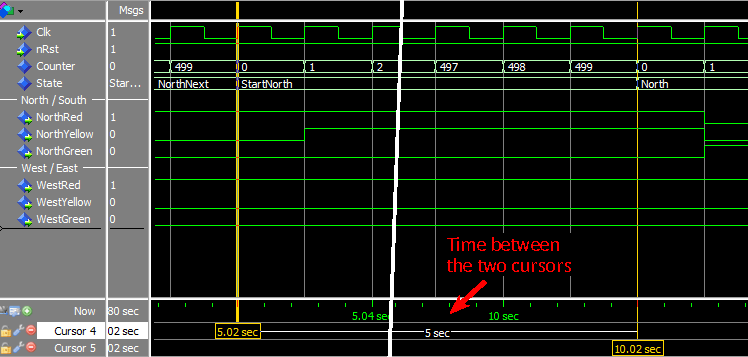
StartNorth との間のトランジションにカーソルを追加した波形 状態:
分析
前のチュートリアル if Counter = ClockFrequencyHz * 5 -1 then のタイマー計算を置き換えました 新しい CounterVal への呼び出しで 作成した関数:if Counter = CounterVal(Seconds => 5) then .
最初の波形スクリーンショットから、モジュールの機能が変更されていないことがわかります。反復タスクに関数を使用することは、優れた設計手法です。特に、計算を Minutes のような用語を含む読みやすい行に置き換えることができる場合 と Seconds .
関数を使用するもう 1 つの利点は、行ごとに行うのではなく、すべてのタイマーの実装を一度に変更できることです。たとえば、 return TotalSeconds * ClockFrequencyHz; と書いた場合 CounterVal で すべてのタイマーが 1 クロック サイクル持続しすぎた可能性があります。これを return TotalSeconds * ClockFrequencyHz -1; に変更できます CounterVal で 機能し、すべてのタイマーが一度に修正されます。
最後の波形のスクリーンショットを調べると、CounterVal から返されたタイマー値から 1 を引く必要がある理由がわかります。 関数。この波形は StartNorth の継続時間を調べます 状態で、正確に 5 秒間持続する必要があります。 State の場合 信号が StartNorth に変更されました 、Counter 値は 0 で、次のクロック サイクル後にのみ変更されます。したがって、500 クロック サイクルまでカウントした場合、StartNorth 状態は実際には 501 サイクル持続したことになります。テストベンチを 100 Hz で実行すると、500 クロック サイクルはちょうど 5 秒になります。
テイクアウト
- 関数は 0 個以上のパラメーターを受け取ることができますが、常に値を返します
- 関数に
waitを含めることはできません ステートメント - 純粋な関数には副作用がありませんが、純粋でない関数には副作用があります。
次のチュートリアルに進む »
VHDL