



非接触ジェスチャー錠: APDS-9960とArduinoでセキュアアクセス
部品と用品
| SparkFun APDS-9960 (ジェスチャー/近接/環境光/色センサー) | ×1 |
| Arduino UNO | ×1 |
| RGB拡散型共通カソードLED | ×1 |
| Adafruit 16×2 LCD (白文字/青背景) | ×1 |
| 抵抗 4.75kΩ | ×2 |
| ジャンパーワイヤー | ×1 |
| 抵抗 1kΩ | ×1 |
アプリとオンラインサービス
- Arduino IDE
このプロジェクトについて
※APDS-9960はArduino NanoやMega 2560では動作しません (検証済み)。
このプロジェクトは簡単に作れて、どんなサーボやラッチ機構にも応用可能。ジェスチャー認証錠の出発点として最適です。
材料
ほとんどの部品はAmazon、APDS-9960はSparkFunで入手。Arduino UNOまたはMicro (3.3V) のみ対応。他のボードは動作しません。
組み立て
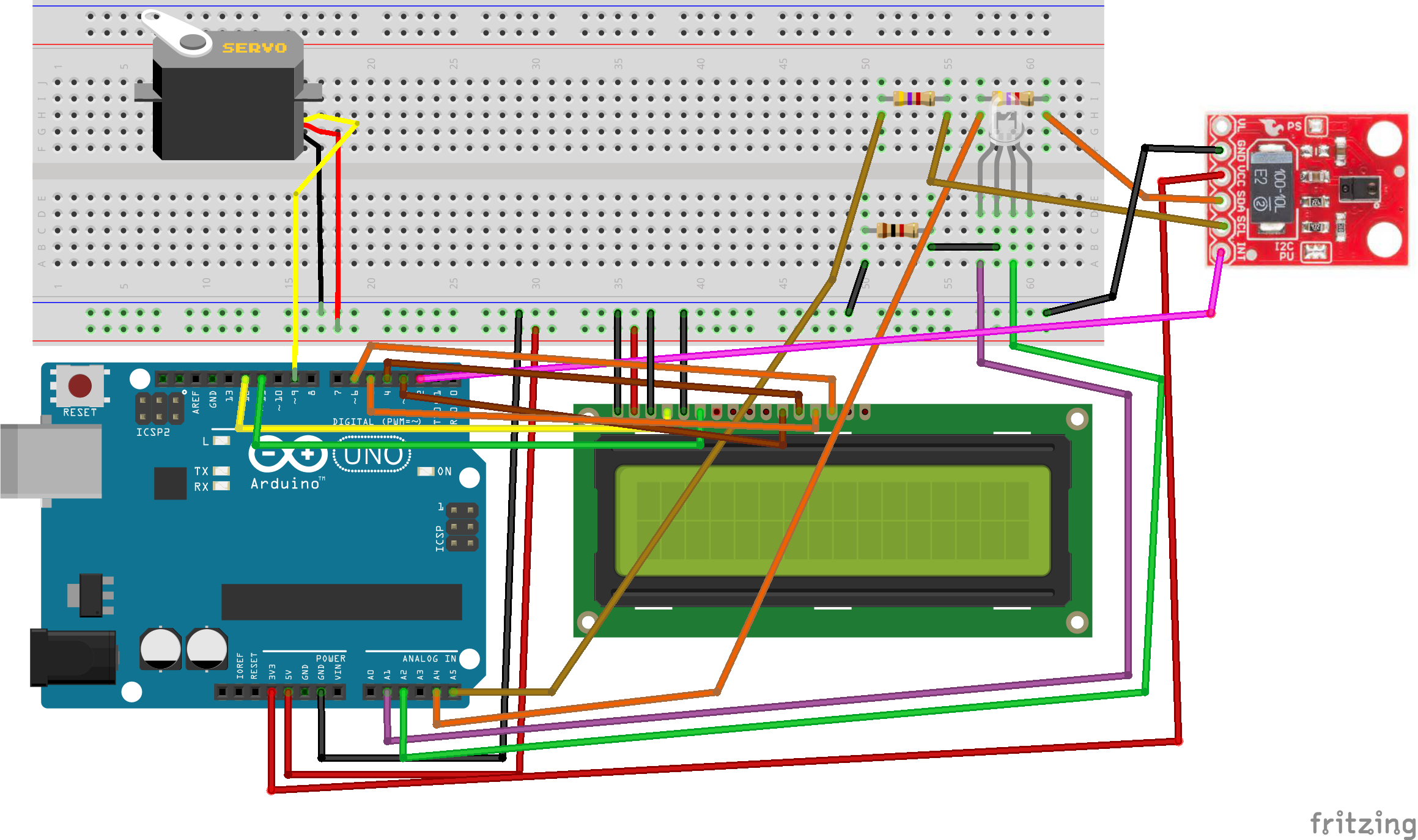
LCDを接続 (10kΩポテンショメータがない場合は1kΩ抵抗でコントラスト-GND間を接続)。APDS-9960はUNO使用時にレベルシフトが必要: SCL/SDAを4.7kΩ抵抗経由で3.3Vにプルアップし、A4/A5に接続 (回路図参照)。9V電池+DCジャックで駆動可能。
ケース
段ボール箱に部品穴を開けて収納。ユニバーサル基板にはんだ付けしても、ブレッドボードのままジャンパー配線でもOK。完成イメージは写真を参照。
コード
/* ハードウェア接続: 重要: APDS-9960は3.3Vのみ対応!
Arduino Pin  APDS-9960  機能
3.3V         VCC        電源
GND          GND        グラウンド
A4           SDA        I2Cデータ
A5           SCL        I2Cクロック
2            INT        割り込み
*/
#include <Wire.h>
#include <SparkFun_APDS9960.h>
#include <LiquidCrystal.h>
#include <Servo.h>

#define PINSIZE 6
#define SERVOPIN 9
#define APDS9960_INT 2

LiquidCrystal lcd(12,11,6,5,4,3);
Servo servo;
uint8_t proximity_data = 0;
int red_led = A1;
int green_led = A2;
int pageNum = 0;
String secret[PINSIZE] = {"UP","DOWN","UP","UP","RIGHT","LEFT"}; // パスワード (大文字でUP/DOWN/LEFT/RIGHT)
String currentGesture = "";
int numRight = 0;
SparkFun_APDS9960 apds = SparkFun_APDS9960();
int isr_flag = 0;

void setup() {
  pinMode(APDS9960_INT, INPUT);
  lcd.begin(16,2);
  servo.attach(SERVOPIN);
  servo.write(0);
  servo.detach();
  Serial.begin(9600);
  Serial.print("Your password is ");
  Serial.print(PINSIZE);
  Serial.println(" gestures long.");
  Serial.println("----------------");
  Serial.println("APDS-9960 Lock");
  Serial.println("----------------");
  attachInterrupt(0, interruptRoutine, FALLING);
  if (apds.init()) Serial.println("APDS-9960 initialization complete");
  else Serial.println("Something went wrong during APDS-9960 init!");
  if (!apds.setProximityGain(PGAIN_1X)) Serial.println("Failed to set PGAIN");
  if (apds.enableProximitySensor(false)) Serial.println("Proximity sensor is now running");
  else Serial.println("Sensor init failed!");
  if (apds.enableGestureSensor(true)) Serial.println("Gesture sensor is now running");
  else Serial.println("Gesture sensor init failed!");
}

void loop() {
  if(pageNum==0){
    if (!apds.readProximity(proximity_data)) Serial.println("Error reading proximity");
    else {
      Serial.println(proximity_data);
      if((proximity_data >= 40) && (pageNum==0)){
        pageNum=1;
        delay(2000);
      }
    }
  }
  switch(pageNum){
    case 0:
      LCDClear();
      lcd.print("Locked- get");
      lcd.setCursor(0,1);
      lcd.print("3 inches away.");
      blinkRed();
      LCDClear();
      break;
    case 1:
      numRight = 0;
      lcd.print("Enter code...");
      lcd.setCursor(0,0);
      for(int x=0; x0;x--){
    LCDClear(); lcd.print("Closing in: "); lcd.setCursor(0,1); lcd.print(x);
    lcd.setCursor(1,1); lcd.print(" seconds..."); delay(1000);
  }
  LCDClear(); lcd.print("Closing");
}
回路図
製造プロセス
- 現代ピンタンブラー錠の進化と製造
- ダイヤル式南京錠:設計、製造、歴史的進化
- スマート渇きアラート植物アラーム – 最適な水やりタイミングを知らせるDIYセンサー
- イタリア語ワードクロック自作:Arduino Nano、NeoPixel、LCD、RTCで時刻を文字で表示
- アナログ3ピンで4×3キーパッドを接続 - Arduinoピン節約テクニック
- Arduino MKR Fox 1200で作る信頼性の高いSigfox kWhメーター
- Bluetooth対応温度モニター:Arduino NanoとHC-06でスマホ監視
- Arduino Nanoコンパニオンキット – 電子工作に必須の部品とツールを搭載した多機能IC型デバイス
- Arduino Micro/Leonardo用 USB-MIDIアダプタキット – 完全パーツリストと実装ガイド
- Arduino用絶縁アナログ入力回路の設計:LM331 V-F変換+フォトカプラでノイズ耐性を確保
- Arduino UNOで作る精密反応速度テスター