



Arduino LCDプロジェクト: 16x2ディスプレイとプッシュボタンで作るサッカーゲーム
必要な部品と用品
| 部品 | 数量 | 備考 |
|---|---|---|
| Arduino UNO | 1 | |
| Adafruit 16x2 LCD(白文字/青背景) | 1 | ピンヘッダーをハンダ付け済み |
| 抵抗 10kΩ | 2 | LCDコントラスト用、ボタン用(プルダウン接続) |
| 抵抗 1kΩ | 1 | LCDコントラスト用(10kΩと直列) |
| プッシュボタン 12mm | 1 | |
| ジャンパーワイヤー | 1セット |
プロジェクト背景
大きなプロジェクトの遅延中に、手元のArduinoキットでLCDを初めて使ってみることにしました。ピンヘッダーのハンダ付けから始め、LiquidCrystalライブラリを学び、数字「0」を画面上で跳ねさせる簡単なアニメーションを作成。そこから発展させて、オリジナルのゲームを作ることにしました。
セットアップ
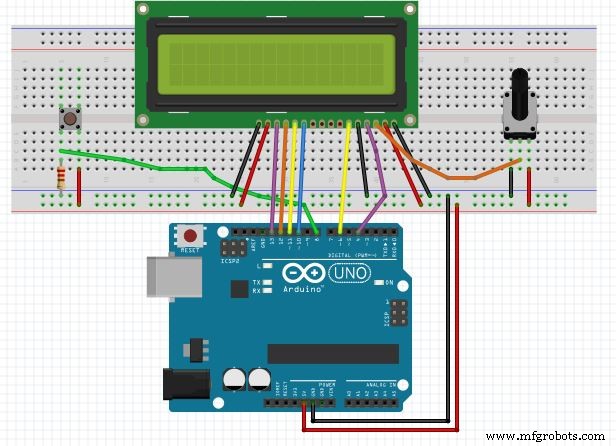
- 回路図に従ってLCDピンをArduinoに配線
- 10kΩポテンショメーターでコントラスト調整後、マルチメーターで抵抗値を測定し、固定抵抗(1kΩ + 10kΩ 直列)に置き換え
- ブレッドボードにプッシュボタンを配置、入力線をArduinoピン8に接続(プルダウン抵抗使用)
- スケッチをアップロードして完了
ゲーム内容: 「ディフェンダーをかわせ!」
- あなたはボールを持ったサッカー選手(画面左端)
- 右からディフェンダーが接近、ボタンでジャンプしてかわす
- ディフェンダー10人を連続でかわせばクリア
- ステージが進むごとにディフェンダーの速度が上昇
- 2018年W杯開催中だったためサッカーテーマに(元は「0」と「1」の記号)
- プレイヤーとディフェンダーのキャラクターグリフは オンラインジェネレーター で作成
スケッチ
/* Dodge the defs!!
 * Created by: Shreyas R P
 * Date: 21-06-2018
 * License: GPL v3
 */
#include

const int btn = 8;  // ボタン入力ピン

// カスタムキャラクタ定義(8x5ドット)
byte runnin1[8] = { 0b01100, 0b01100, 0b00000, 0b11100, 0b01110, 0b01100, 0b11110, 0b00011 };
byte runnin2[8] = { 0b00110, 0b00110, 0b00000, 0b00111, 0b01110, 0b00110, 0b01110, 0b00101 };
byte jump[8]    = { 0b00100, 0b01100, 0b11100, 0b01110, 0b01100, 0b11111, 0b00000, 0b00001 };
byte def1[8]    = { 0b00100, 0b00110, 0b00111, 0b01110, 0b00110, 0b01111, 0b01000, 0b00000 };
byte def2[8]    = { 0b00100, 0b00110, 0b00111, 0b01110, 0b00110, 0b00110, 0b00110, 0b00010 };
byte slide[8]   = { 0b00000, 0b00000, 0b00011, 0b00011, 0b00000, 0b01111, 0b11111, 0b00000 };

LiquidCrystal lcd(4, 6, 10, 11, 12, 13);  // RS, EN, D4, D5, D6, D7

int game = 0;
int score = 0;
int obstaclePos, obsDelay;
unsigned long lastDebounceTime = 0;
const unsigned long debounceDelay = 50;
int lastButtonState = LOW;

void setup() {
  Serial.begin(9600);
  pinMode(btn, INPUT);
  lcd.begin(16, 2);
  lcd.createChar(0, runnin1);
  lcd.createChar(1, runnin2);
  lcd.createChar(2, jump);
  lcd.createChar(3, def1);
  lcd.createChar(4, def2);
  lcd.createChar(5, slide);
}

void loop() {
  intro();
  while (game == 1) ballActive();
  endGame();
}

void intro() {
  score = 0;
  lcd.clear(); lcd.print("Dodge the defs!!");
  lcd.setCursor(7, 1); lcd.print("By SRP888"); delay(2000);
  lcd.clear(); lcd.print("Created on:");
  lcd.setCursor(0, 1); lcd.print("21-06-2018"); delay(2000);
  lcd.clear();
  while (button() != 1) {  // ボタン待ち
    lcd.setCursor(0, 0); lcd.print("Hit the button...");
    delay(100);
  }
  game = 1;
}

void reset() {
  // プレイヤー走行アニメーション(2コマ切り替え)
  if (obstaclePos % 2 == 0) {
    lcd.clear(); lcd.setCursor(0, 1); lcd.write(byte(0));
  } else {
    lcd.clear(); lcd.setCursor(0, 1); lcd.write(byte(1));
  }
}

void ballActive() {
  obsDelay = 200;
  obstaclePos = 15;  // 右端から開始

  while (game == 1) {
    reset();

    if (button() == 1) {  // ボタン押下:ジャンプ
      lcd.clear(); lcd.setCursor(0, 0); lcd.write(byte(2));
      obstacle(obstaclePos);
      delay(400);
      lcd.clear(); lcd.setCursor(0, 1); lcd.write(byte(1));
      obstacle(obstaclePos);
    } else {
      if (obstaclePos != 0) {
        reset(); obstacle(obstaclePos);
      } else {  // ディフェンダーがプレイヤー位置に到達=ゲームオーバー
        game = 0; break;
      }
    }

    obstaclePos--;  // ディフェンダー前進

    if (obstaclePos < 0) {  // 成功:次のディフェンダーへ
      obsDelay -= 20;       // 速度アップ
      obstaclePos = 15;
      score++;
    }
    if (obsDelay == 0) game = 0;  // 10人かわしたらクリア
    delay(obsDelay);
  }
}

// チャタリング対策付きボタン読み取り
int button() {
  int reading = digitalRead(btn);
  if (reading != lastButtonState) lastDebounceTime = millis();
  if ((millis() - lastDebounceTime) > debounceDelay) {
    if (reading == HIGH) {
      lastButtonState = reading;
      return 1;
    }
  }
  lastButtonState = reading;
  return 0;
}

void obstacle(int pos) {
  if (pos % 2 == 0 && pos > 2) { lcd.setCursor(pos, 1); lcd.write(byte(3)); }      // 走行1
  else if (pos % 2 != 0 && pos > 2) { lcd.setCursor(pos, 1); lcd.write(byte(4)); } // 走行2
  else { lcd.setCursor(pos, 1); lcd.write(byte(5)); }                                // スライディング
}

void endGame() {
  lcd.clear();
  if (score == 10) {
    lcd.print("Congratulations!");
    lcd.setCursor(0, 1); lcd.print("You beat 'em all");
  } else if (score < 3) {
    lcd.print("You suck");
    lcd.setCursor(0, 1); lcd.print("Score: "); lcd.print(score);
  } else if (score < 6) {
    lcd.print("Not bad!");
    lcd.setCursor(0, 1); lcd.print("Score: "); lcd.print(score);
  } else {
    lcd.print("Great!");
    lcd.setCursor(0, 1); lcd.print("Score: "); lcd.print(score);
  }
  delay(3000);
}
回路図
製造プロセス
- 産業用タッチスクリーン修理:迅速・低コストの実証済み手順
- ラピッドプロトタイピングが製品開発成功に不可欠な理由
- プロダクトデザインの達人になる:よくある課題を克服する実証済み戦略
- 液晶ディスプレイ(LCD):技術、製造、将来展望
- Raspberry PiとDS18B20によるプロフェッショナルな温度監視
- Primal Display:Raspberry Pi LCD温度モニターの構築
- Drone Pi:スマートフォンとリモコンのデュアル操作対応 Multiwii & Raspberry Pi クアッドコプター
- アーキメデス:感情センシングAIロボットフクロウ
- 2024年最新!用途別リーフブロワー選び方完全ガイド
- 四極管:設計、機能、増幅器性能への影響
- 戦略的データソーシング:レジリエントなサプライチェーンの鍵